How to Learn Unreal Engine (2026 Complete Beginner Guide)
Master Unreal Engine with our complete 2026 beginner guide. Learn fundamentals, practice with simple games, and build consistent learning routines for success.

Learning Unreal Engine feels overwhelming when you first open it up. All those tools, systems, and features staring back at you. But here's the thing – you don't need to master everything at once. With the right approach, how to learn Unreal Engine becomes a manageable journey that anyone can tackle.
I am an authorized Unreal Engine instructor and have released my own video game using Unreal Engine. In this blog I will cover 5 steps you can follow to learn Unreal Engine.
Master Unreal Engine Fundamentals
You wouldn't drive a car without knowing where the brake pedal is. Same logic applies here. You need to understand how Unreal Engine works before building anything meaningful.
Start with these core concepts:
- Interface navigation and basic controls
- Object placement techniques
- Blueprint basics and their purpose
- Project organization fundamentals
Good news for beginners. Unreal Engine 5.7 includes a brand new "Intro to Unreal" template specifically designed for newcomers. This interactive guide walks you through the most common settings and workflows. You'll find it when creating a new project just make sure you're using version 5.7 or newer.
Free Unreal Engine beginner tutorial resources are everywhere online. Pick one that matches your learning style and stick with it until you understand the fundamentals. No jumping around between courses.
Build 3-5 Simple Practice Games
Here's where most people mess up. They learn the basics, then immediately try to build their dream game. Bad idea.
When playing a video game they don't throw you at the final boss after the tutorial. Why? You'd get destroyed. Same principle applies to learning game development. You need to level up gradually.
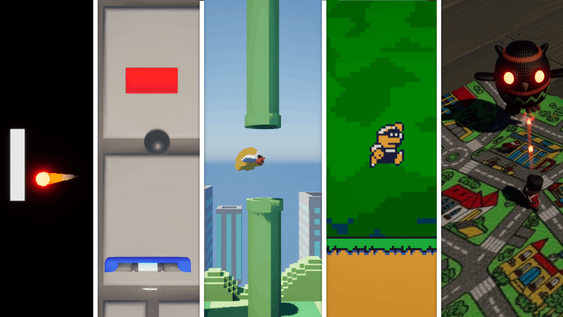
Start with these simple games in Unreal Engine:
- Flappy Bird clone
- Space Invaders recreation
- Basic Pong game
- Platformer
Build three to five simple game projects. Each one teaches you different aspects of Unreal Engine. You'll learn about movement systems, collision detection, UI elements, and basic game logic.
Follow tutorials for your first couple of projects. Then try building one from scratch using what you've learned. That's when real learning happens when you solve problems independently.
Define Your Unreal Engine Learning Goals and Break Them Down
Wandering in an endless void. That's what happens when you don't have clear objectives for your learning journey.
Set a concrete goal. Something specific you want to build. Maybe it's a short horror game, a platformer, or an interactive architectural visualization. Doesn't matter what just pick something that excites you.
Let's say you want to create a mascot horror game. Here's how to break it down:
- Choose your setting (amusement park, school, mall)
- Define the plot and player objectives
- Design your mascot character(s)
- List core game mechanics
- Plan puzzle elements
- Outline progression system
Write everything down. You're creating a syllabus for your personal game development course. Just like school exams have study guides, your project needs a clear roadmap.
Master Chunking Techniques for Complex Unreal Engine Projects
Big tasks paralyze people. Small tasks get done.
The journey of 1,000 miles starts with a single step. Mountain climbers don't think about reaching the summit they focus on the next foothold. Apply this same mindset to your Unreal Engine practice projects.
Take any overwhelming feature and break it down further. Character movement system feels too complex? Split it into:
- Basic forward/backward movement
- Left/right turning
- Jump mechanics
- Animation integration
- Physics interactions
Still too big? Break down "basic forward movement" into:
- Detect input
- Apply force to character
- Test movement speed
- Add movement constraints
Use tools like Miro or simple to do lists to track these micro tasks. Cross off completed items daily. Progress becomes visible and motivation stays high.
Remember if you're struggling with any task, it's not small enough yet. Keep breaking it down until each step feels almost impossible to fail.
Build a Consistent Unreal Engine Learning Routine
Consistency beats intensity every single time.
School worked because of structure. You knew when classes started, what you'd learn, and when they ended. Random learning doesn't work your brain needs predictable patterns to build skills effectively.
Create your own Unreal Engine learning routine. Here are some examples:
- "Every Tuesday and Thursday at 7 PM, I work on my game for 1 hour"
- "Saturday mornings for 45 minutes, I follow tutorials"
- "Daily 20 minute sessions before work"
Some days you won't feel motivated. Do it anyway. That's when real progress happens when you show up regardless of mood. Routine makes progress inevitable.
Take breaks when needed. This should be enjoyable, not a grind. But maintain your schedule as much as possible. Skills develop through repetition over time.
Bonus Tips for Your Unreal Engine Beginner Tutorial Journey
Stuck on a tutorial? Try these troubleshooting techniques first:
Rewatch the video section. Slow down playback speed if needed. Most video players let you adjust speed to 0.75x or 0.5x for clarity.
Check YouTube comments. Other learners often share solutions to common problems in the comments section. Sometimes you'll find fixes for issues the creator didn't address.
Two monitors change everything. Keep your tutorial on one screen, Unreal Engine on the other. No more constantly switching between windows. Single monitor? No problem, but dual screens definitely speed up your workflow.
The Fab Store offers thousands of assets for complex projects. But here's the catch only use assets when you understand them completely. Read documentation thoroughly. Make sure the asset fits your project's scope.
Start simple before using advanced asset packs. Build experience with basic Unreal Engine tools first. Complex assets become much easier to integrate when you understand the engine's fundamentals.
FAQ (Frequently Asked Questions)
How long does it take to learn Unreal Engine basics?
Most people grasp the fundamentals within 2-4 weeks of consistent daily practice. Expect to spend 1-2 hours daily during this learning phase. Building your first simple game typically takes another 2-3 weeks after learning the basics.
Should I learn C++ or stick with Blueprints when starting?
Start with Blueprints exclusively. They're visual, intuitive, and perfect for beginners. You can build complete games using only Blueprints. Learn C++ later if you need performance optimization or want to work at larger studios.
What's the best way to learn Unreal Engine 2026 without spending money?
Use Epic Games' free learning resources, YouTube tutorials, and the new "Intro to Unreal" template in version 5.7. The engine itself is free, and there are countless quality tutorials available at no cost.