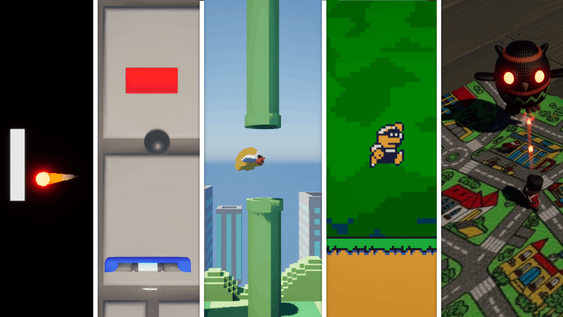
How To Finish Your First Game This Year With Unreal Engine
Discover the best first game to make in Unreal Engine. Learn why simple arcade games beat complex projects for beginners.

You've just downloaded Unreal Engine. You've seen all the incredible projects people are creating. And you think to yourself, "I could build something like that." The harsh truth? You can't. At least not yet. The first game to make in Unreal Engine isn't your dream AAA title or that complex RPG you've been sketching in your notebook. It's something much simpler, and there's a very good reason why.
Every new developer faces two major roadblocks that can kill their motivation before they even get started. The first is jumping into projects way above their skill level. The second is never actually finishing anything. But there's a solution that sidesteps both problems completely.
The Two Biggest Beginner Game Developer Mistakes in Unreal Engine
Problem 1: Not Ready for the Final Boss
Think about any video game you've played. Would you walk straight into the final boss fight at level one? Of course not. You'd get destroyed instantly. Yet that's exactly what most beginners do with game development.
They see a beautiful open-world game and think, "I'll start there." They attempt to juggle inventory systems, dialogue trees, quest mechanics, and character progression before they've even mastered basic player movement. It's like trying to perform surgery when you haven't learned to use a scalpel.
Complex games require mastered fundamentals. Period. You need to understand collision detection before you can build combat systems. You need to grasp basic AI before creating sophisticated enemy behaviors.
Problem 2: The Scope Creep Game Development Trap
Here's how it usually goes. A beginner starts making a simple top-down shooter. They get basic shooting working. Then they think, "You know what would be cool? A crafting system." Next comes, "What about smarter AI?" Before they know it, they're drowning in half-implemented ideas.
Three months later, they haven't finished a single complete gameplay loop. This is scope creep, and it's a project killer. It's not lack of talent that destroys these games. It's the "just one more feature" mentality that turns a manageable project into an overwhelming mess.
The solution? Pick something so constrained that you literally cannot make it bigger without breaking it.
Why Simple Games for New Developers Are Your Secret Weapon
The 50% Rule Every Beginner Ignores
When you have a playable prototype where you can move around and shoot things, you might think you're almost done. Wrong. You're about 50% finished.
Here's what you're still missing:
- Main menu system
- Settings and audio menus
- Pause functionality
- Win and lose conditions
- Tutorial implementation
- Game packaging and export
- Screenshots and marketing assets
- Platform upload (itch.io, Steam)
This other 50% isn't fun. It can be frustrating. But it's where you learn what "done" actually feels like. Skip this, and you'll be trapped in the "always almost finished" state forever.
Breaking the Endless Project Cycle
Starting new projects feels easier than finishing old ones. That's why so many developers have folders full of abandoned prototypes. You need to practice completion. Choose a game so simple that you can breeze through that final 50% and actually ship something.
Classic Arcade Games Development: Your Perfect Training Ground
Why Arcade Games Unreal Engine Projects Work
The games I recommend for beginner Unreal Engine projects aren't retro for nostalgia's sake. They're perfect because they were designed under severe constraints.
Limited storage meant no complex save systems. Limited processing power meant simple AI patterns. The arcade business model demanded quick sessions with ramping difficulty instead of complex progression systems.
These constraints accidentally created perfect training wheels for game development. They're so tight you can't add "just one more feature" without breaking the entire design.
Five Beginner Unreal Engine Projects That Teach Core Skills
Pong Unreal Engine Tutorial Benefits: Master collision detection and physics fundamentals. Learn how objects interact and bounce off each other.
Space Invaders Game Tutorial Skills: Build projectile systems and wave spawning mechanics. Understand enemy movement patterns and player progression.
Frogger Development: Practice timing mechanics and obstacle avoidance. Learn to create predictable but challenging movement patterns.
Pac-Man Recreation: Implement grid-based movement and basic AI that can chase the player. Understand pathfinding basics.
Asteroids Clone: Master 360-degree movement and object interaction systems. Learn about momentum and space-based physics.
How to Make Your First Game to Make in Unreal Engine Stand Out
Adding Personality Without Breaking Structure
You're not just recreating these games exactly. Use them as your foundation, then inject personality.
Classic Pong has no particle effects. You could add trail effects on the ball. Maybe the ball explodes when someone scores. Add screen shake for impact. Change the black background to a space theme.
These modifications teach you about trade-offs. Every addition has consequences. Do you add this feature or keep it simple? Do you polish this more or move forward? These decision-making skills matter more than any specific technical knowledge.
Learning Through Constraints
The beauty of arcade games Unreal Engine development is that the constraints protect you from yourself. You can't turn Pong into an RPG without breaking what makes Pong work. This forces you to focus on execution rather than feature creep.
Your Two Week Challenge: Finishing Your First Game
The Complete Finish Line Checklist
Pick one arcade game. Give yourself two weeks. Not for a playable prototype, but for a complete, shippable game.
Your checklist:
- Functional main menu
- Game over screen with restart option
- Basic audio implementation
- Build and package process
- Upload to itch.io
Why This Process Builds Future Success
Your first game will be rough. Your second will be better. Your fifth will actually be pretty good. But you can't reach game five without finishing game one.
Shipping teaches you things tutorials never can. How players actually interact with your game. What breaks under real use. How to handle feedback and iteration.
Start Small, Finish Strong
The path from beginner to competent developer isn't about making your dream game first. It's about learning to make decisions, solve problems, and most importantly, finish what you start.
These simple games for new developers aren't limitations. They're launch pads. Master one, then move to something slightly more complex. Build that completion muscle. Learn what shipping feels like.
Your dream game isn't going anywhere. But the skills you need to build it? Those come from finishing small projects first. Pick your arcade game. Set your two-week timer. And prove to yourself that you can cross the finish line.
FAQ (Frequently Asked Questions)
What if I think arcade games are too boring to make?
The arcade game provides structure, but you add the personality. You can change themes, add visual effects, implement your own art style, and modify mechanics while keeping the core design intact. Many successful indie games are essentially arcade games with modern polish and creative twists.
How long should I spend on my first arcade game project?
Two weeks is the recommended timeframe. This forces you to scope appropriately and focus on completion rather than perfection. If you're not finished in two weeks, you're probably adding too many features or over-polishing early systems.
Which arcade game should I choose for my first project?
Start with Pong if you're completely new to game development. It teaches collision detection and basic physics with minimal complexity. If you want something slightly more involved, try Space Invaders for projectile systems or Frogger for timing mechanics.
Do I need to make the game exactly like the original?
No. Use the original as your foundation but feel free to add your own visual style, sound effects, and small gameplay tweaks. The key is maintaining the core constraints that make the original design work while expressing your creativity within those boundaries.
What should I do after finishing my first arcade game?
Upload it to itch.io, get feedback from players, then move on to your next project. Consider making another arcade game with slightly different mechanics, or try combining elements from two simple games. The goal is to keep building that completion muscle while gradually increasing complexity.