
Create Your First Game in Unreal Engine
Learn Unreal Engine 5 game development with our complete beginner's course. Create 5 games using Blueprint visual scripting no coding required!

Ever dreamed of creating your own video games but felt overwhelmed by complex programming languages? You're not alone. Many aspiring game developers believe they need years of coding experience to bring their ideas to life. However, with the right Unreal Engine 5 game development course, you can start building games today using visual scripting instead of traditional code.
The beauty of modern game development lies in tools like Blueprint visual scripting. These systems transform complex programming concepts into drag and drop nodes that anyone can understand. No more staring at lines of confusing code. Instead, you connect visual elements to create game logic.
Why Choose Unreal Engine 5 for Beginner Game Development?
Unreal Engine 5 stands as the industry standard for professional game development. Epic Games designed it with accessibility in mind. The Blueprint system means you can create games without coding while still producing professional quality results.
Here's what makes it perfect for beginners:
- Zero programming experience required to get started
- Visual scripting eliminates syntax errors and debugging headaches
- Massive community support with thousands of tutorials and resources
- Completely free to use for learning and small projects
- Same engine used by major studios for AAA titles
The transition from beginner to confident developer happens faster than you might expect. Most students see significant progress within their first few projects.
Master Blueprint Visual Scripting Tutorial Through 5 Complete Games
Learning game development works best through hands on practice. That's why building five complete games provides the perfect progression path. Below I have listed 5 games that will develop your skills.
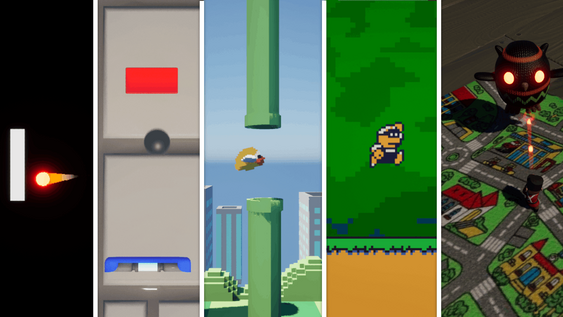
Game 1: Pong serves as your introduction to the fundamentals. You'll learn player input handling, collision detection, and basic scoring systems. Simple mechanics. Big learning impact.
Game 2: Brick Breaker expands your toolkit with power up systems and level design principles. You'll discover how to manage multiple game objects and create satisfying gameplay loops.
Game 3: Flappy Bird Clone introduces procedural generation and endless gameplay mechanics. These concepts form the backbone of many successful mobile games.
Game 4: 2D Platformer draws inspiration from classic Mario games. Here you'll build character controllers, enemy AI, and life systems. This project bridges the gap between simple and complex game mechanics.
Game 5: Top Down Shooter represents your capstone project. Wave management systems, multiple AI types, and advanced power ups showcase your growing expertise.
Ready to build these five games yourself?
This exact five game progression is the backbone of my course, Create Your First 5 Games In Unreal Engine. Unlike scattered YouTube tutorials that leave you with half finished projects and no clear direction, I guide you step by step through every Blueprint node and game mechanic. You'll go from "I don't know where to start" to publishing your own playable games.
FAQ (Frequently Asked Questions)
Do I need any programming experience to start this Unreal Engine 5 course?
No programming experience is required. The course uses Blueprint visual scripting, which eliminates the need to write traditional code. You'll learn by connecting visual nodes instead of typing complex syntax.
How long does it take to complete all five games?
Most students complete the entire course within 1-3 months when dedicating 1-2 hours per day. However, you can work at your own pace since the content remains accessible indefinitely.
What equipment do I need besides a computer?
You only need a computer capable of running Unreal Engine 5 and the free engine software itself. No additional hardware, software licenses, or subscriptions are required to complete the course.
Can I publish and sell games I create during the course?
Yes, you retain full ownership of any games you create. Unreal Engine 5 is free to use for projects earning under $1 million in revenue, making it perfect for indie developers and beginners.
What happens if I get stuck on a particular lesson?
The course includes community access where you can ask questions and get help from other students and the instructor. Additionally, each lesson is designed to be self contained with clear explanations and demonstrations.
